
DELETE YOUR ACCOUNT
Hand Legend · هاند الأساطير
Developer: TwinkleTech Games · Last Updated: September 1, 2026
This page explains how to delete your account for Hand Legend (هاند الأساطير), the mobile game developed by TwinkleTech Games, and what happens to your data when you do.
Deleting your account is permanent and cannot be undone. All of your game data, including every player game asset, is deleted. There is no retention period, deletion takes effect immediately, and your account cannot be recovered. Please proceed carefully.
How to delete your account
You can delete your account directly inside the game. Before you start, make sure you are signed in to the account you want to delete — deletion applies only to the account currently in use.
- Open the game. Launch Hand Legend on your device and sign in with the account you want to delete.
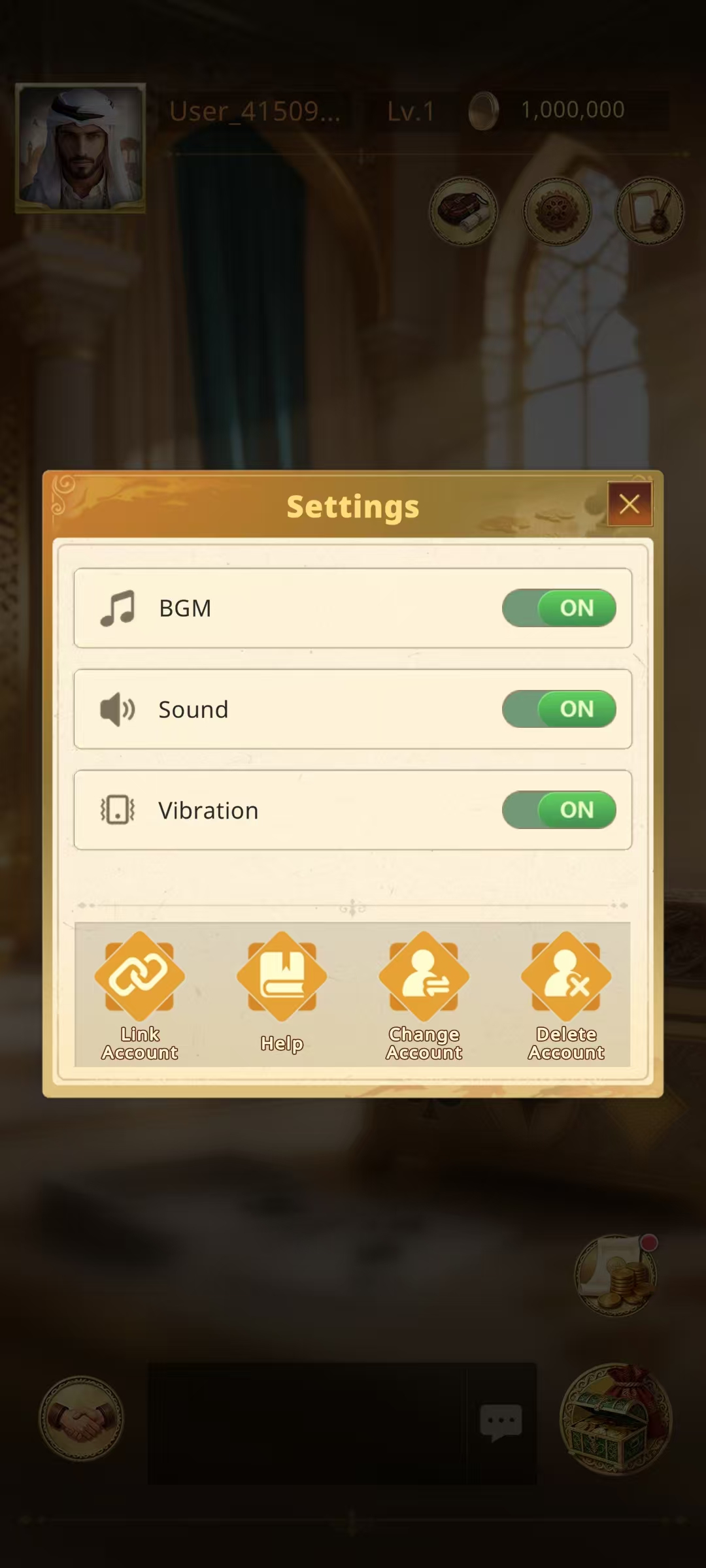
- Open Settings. Tap the Settings button in the game to open the Settings screen.
- Tap “Delete Account.” At the bottom of the Settings screen, tap the Delete Account button, as shown in the screenshot.
- Confirm the deletion. Follow the confirmation prompt on screen to permanently delete your account.
What is deleted
When you confirm deletion, your account and all data associated with it are permanently deleted, including:
- Your account and player profile, including your username, avatar, and profile customization;
- All player game assets, including coins, items, and inventory;
- Your game progress, level, and progression;
- Your friend list, in-game mail, and chat history;
- Your daily check-in records and in-game activity associated with the account;
- Linked third-party login connections, such as Google or Facebook.
We do not retain your account data or any player game assets after deletion.
Data retention
There is no retention period. Deletion takes effect immediately after you confirm it, and no copy of your data is kept. Once your account is deleted, it cannot be restored and your game assets cannot be recovered.
Need help?
If you cannot open the game or need help deleting your account, email us at twinkletechgames@gmail.com and include your account ID (UID) if you know it.